


Word Solitaire Now!
4.51.62K Reviews
App Specs
- Version
- 2.4.0
- Updated On
- License
- Free
- Downloads
- 1,000,000+
- Developer
- MAXX GAMES
- Categories
- Word
- Platform
- Android
Screenshots
 Analysis by AppCompare
Hey there, fellow app enthusiasts! Today, I took a deep dive into the world of Word Solitaire Now!, and let me tell you, it’s a delightful mix of card game nostalgia with a word puzzle twist. If you’re someone who enjoys a good brain teaser with a splash of classic card games, then you might want to stick around for this one.
What to expect from a word-and-card puzzle
At its heart, this is a word game shaped around solitaire-style sorting rather than a conventional crossword or word search. That difference matters: you are not simply scanning a grid for a hidden answer. You are working with letter cards and making choices about how to arrange them, so the appeal comes from combining language with a little planning.
I would approach it as a calm, focused diversion, not as a high-pressure test of vocabulary. The format suits a short pause when you want something more thoughtful than scrolling but less demanding than a long strategy game. If you already enjoy moving pieces around until a pattern becomes clear, the word element gives that familiar routine a fresh purpose.
The main trade-off is that this style asks you to think in two directions at once: which letters can make a word, and whether moving them helps the overall arrangement. Players who prefer a fast stream of trivia questions or an open-ended word board may find that structure restrictive. I like the extra layer, but it does mean the game’s rhythm is deliberate rather than frantic.
The Unique Blend of Cards and Words
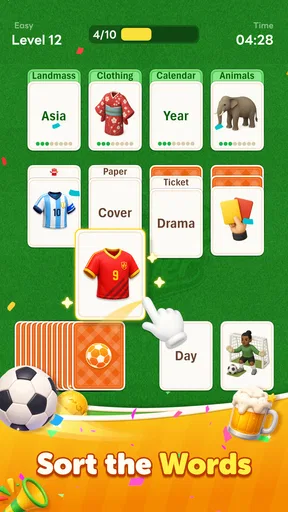
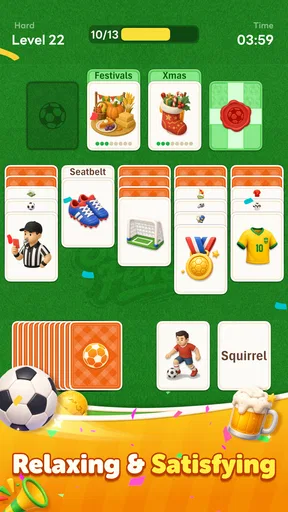
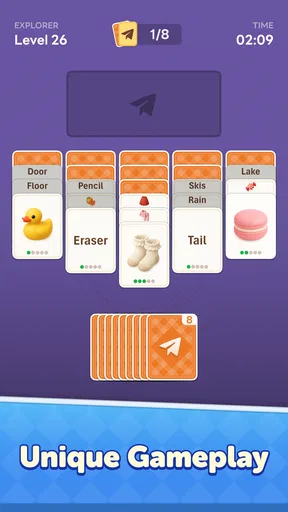
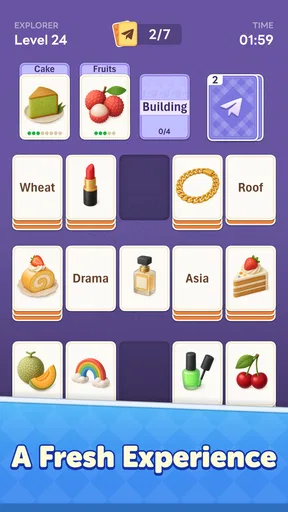
When I first launched Word Solitaire Now!, I was greeted by a sleek and friendly user interface that immediately drew me in. The app cleverly combines the traditional solitaire card layout with the challenge of forming words. It’s like your classic solitaire grew a vocabulary and decided to challenge you!
So, how does it work? Instead of the usual numbers, the cards are marked with letters. Your goal is to create words by stacking these lettered cards, similar to how you’d organize numbers in the classic version. It’s a simple concept, but trust me, it’s just as addictive. The game progressively gets more challenging as you advance through levels, which keeps things fresh and exciting.
Getting started without overthinking it
The game is free to download, and I’d begin by opening a puzzle and taking a moment to read the layout before moving anything. The first useful habit is to look for letters that seem to offer more than one possible word, rather than committing to the first combination that comes to mind. That small pause helps you learn the sorting logic while avoiding unnecessary reshuffling of your plan.
Worth Reading Before You Choose

Switching to Android Auto Means Rethinking Your Driving Routine

Google Calendar Makes a Crowded Week Easier to Manage

Baby Panda World Brings Quick Play to Modern Phones, but Its Game Library Feels Busy

ESPN’s Live Game View Makes Following Close Games Easier

QuizzLand Review: A Good Fit for Short Trivia Breaks, Not Every Player

Basketball Stars: Multiplayer Is Fast, but Can It Recover When Matches Go Wrong?
For a first successful move, try treating each possible word as a route through the cards instead of as a standalone answer. Ask yourself which letters are easiest to use now and which might become awkward if they are buried or separated by a move. This is a practical way to build confidence: you are not expected to see the whole solution at once, just to make one sensible move and check how the layout changes.
If the puzzle stops making sense, the hint feature can offer a nudge. I’d use it after giving the board a fair look, not immediately; trying first makes the suggestion more useful because you can compare it with your own reasoning. A hint is best treated as a way to understand the game’s priorities, rather than as a button to press whenever a decision feels uncertain.
Gameplay and Features
The gameplay is smooth, and the controls are intuitive, which is always a win in my book. You can drag and drop or tap to move the cards, which makes for a seamless experience. One thing I particularly enjoyed was the hint feature. If you ever find yourself stuck, a gentle nudge in the right direction is just a click away.
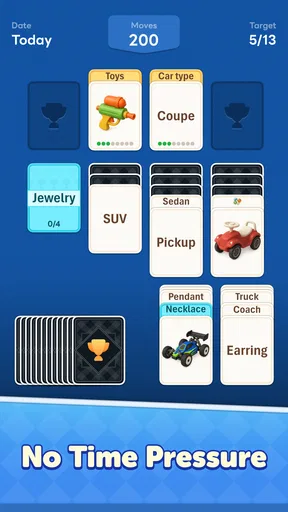
Another feature that I appreciated is the daily challenges. These are perfect for when you just want a quick game fix or need to break up your day with a fun mental exercise. Plus, completing these challenges earns you rewards, which adds a nice motivational touch.
The app also includes a leaderboard where you can compete with friends and other players worldwide. This competitive aspect adds an extra layer of fun, especially if you’re someone who thrives on a little friendly competition.
Small choices that make a session work better
Because a letter move can change what remains available, I find it useful to scan for obvious short words before spending time on a more ambitious one. This is not a rule that guarantees a solution; it is a way to reduce the chance of overlooking a simple route while concentrating on a longer possibility. When two options seem equally good, I’d favor the one that leaves more letters accessible for the next decision.
There is also a useful distinction between a puzzle that is difficult and one that is simply unfamiliar. If a move does not seem to help, pause and inspect what the new arrangement made easier or harder. That turns trial and error into a small lesson about the sorting pattern. It’s especially helpful during a quick break, when restarting mentally from scratch can feel more frustrating than the puzzle itself.
For an everyday example, I can see myself opening it while waiting for a coffee or sitting down for a few quiet minutes between tasks. I’d play one puzzle with notifications and other distractions out of the way, then stop once I had a natural point to put the phone down. The format offers a clear mental focus, but it still works best when you can give the letters a little attention instead of trying to play while rushing through something else.
How it fits beside other word games
Compared with a crossword, this asks less about clues and outside knowledge; compared with a word search, it asks for more active organization. It also differs from a standard solitaire game because the letters make vocabulary part of each decision. That makes it a good middle ground for someone who likes card-table structure but wants words to matter, rather than a better choice for every word-game fan.
If you mainly want to discover words freely, a crossword, anagram game, or open letter-board puzzle may give you more room to explore. If you like sorting and gradual problem-solving, this particular blend is more distinctive. I’d choose it for a relaxed logic session, while picking a faster word game when I wanted rapid rounds or a more direct vocabulary challenge.
Who will enjoy it, and who may not
I’d recommend it to players who like orderly layouts, gentle mental challenges, and the satisfaction of finding a workable sequence among letter cards. It can also suit someone who knows traditional solitaire but is curious about a word-focused variation. The game is free, though it includes optional in-app purchases priced at $9.99 per item, so I’d keep that in mind if you prefer to avoid spending inside games.
It may be a poor fit if you dislike card-based layouts, want every round to be a quick reflex test, or prefer word puzzles built around definitions and clues. The sorting format is the point, and it will not feel as open as making words from a loose pile of letters. I also would not treat the leaderboard as the main reason to play if personal progress and quiet concentration are what you enjoy most.
Aesthetics and User Experience
The design of Word Solitaire Now! is minimalistic yet vibrant, with a pleasing color palette that’s easy on the eyes. The animations are smooth, and the sound effects are subtle, enhancing the overall user experience without being overwhelming.
As someone who’s picky about app design, I found the layout to be both functional and aesthetically pleasing. The menus are easy to navigate, and the loading times are impressively fast. It’s clear that the developers put a lot of thought into creating a user-friendly experience.
What to know before settling in
The game is made by LOST TEMPLE GAMES, carries a Teen content rating, and its current version is 1.5.0. It was released on December 8, 2025, and requires Android 8.0 or later. Those details make it easier to judge whether it fits your device and household; for younger players, I’d check the age guidance before handing over a phone.
Its audience figures suggest that plenty of people have tried it: it has over 500,000 installs, an average rating of 4.5 from around 23,000 ratings, and 521 written reviews. I take those figures as useful context, not a promise that every puzzle style will suit me. The best test is whether arranging letters in a card layout feels satisfying after a few moves.
One practical question is whether it works for a tiny gap in the day. The daily challenges make that kind of session appealing, though I would not assume every puzzle takes the same amount of time. Another is whether I need to be an expert in either genre: I don’t think so. Familiarity with solitaire can make the layout feel less foreign, but the letter-based goal is simple enough to learn by trying a move and watching what it changes.
If you are deciding between this and another word game, consider what you want from the session. Pick this when you want to sort, plan, and form words at a measured pace. Choose a crossword when clues are the fun part, or a quick anagram game when you want a more immediate answer hunt. That distinction is more useful than expecting one title to cover every kind of word-puzzle mood.
Why You Should Try It
If you’re looking for a game that’s both relaxing and mentally stimulating, Word Solitaire Now! is definitely worth a try. It’s perfect for those moments when you want to unwind but still keep your brain engaged. The blend of solitaire and word puzzles is unique and refreshing, providing a new twist on two beloved genres.
Whether you’re a fan of word games, card games, or both, this app offers something for everyone. It’s a great way to enhance your vocabulary and sharpen your strategic thinking skills, all while having fun.
In conclusion, Word Solitaire Now! delivers a delightful gaming experience that’s both challenging and rewarding. It’s perfect for casual gamers and word enthusiasts alike. So, if you’re ready to test your word-forming prowess and strategic skills, go ahead and download the app. You won’t be disappointed!
My recommendation after a first session
My honest recommendation is to try a few moves with patience before deciding whether the format clicks. I would not expect it to replace every word game on my phone: its appeal is specifically the bridge between sorting letter cards and spotting words. That focus is also its limitation, but for a calm puzzle break it gives me a clear reason to return.
In short, I’d choose it when I want to concentrate without feeling rushed, and skip it when I’m craving clues, rapid rounds, or a less structured word challenge. If that measured card-and-letter rhythm sounds appealing, it is an easy free game to explore, with the optional purchase cost worth remembering before making any in-game spending decisions.
Pros
- Engaging gameplay with a unique twist.
- Visually appealing and easy to navigate.
- Wide range of puzzles and challenges.
- Offline mode available for uninterrupted play.
- Regular updates with new content.
Cons
- In-app purchases can be pricey.
- Limited free hints available.
- Ads can be intrusive at times.
- Some puzzles may feel repetitive.
- Requires frequent internet connection.
FAQs for Word Solitaire Now!
What is Word Solitaire Now! and how does it work?
Word Solitaire Now! is a unique blend of word puzzles and classic solitaire card games. Players create words using lettered cards, strategically placing them to clear the board. The game challenges your vocabulary and problem-solving skills, offering a fresh twist on traditional card games.
Is Word Solitaire Now! free to play?
Yes, Word Solitaire Now! is free to download and play on both Android and iOS devices. However, it offers in-app purchases that can enhance gameplay, such as purchasing additional hints or removing ads. These purchases are optional and not required to enjoy the full experience.
What are the main features of Word Solitaire Now!?
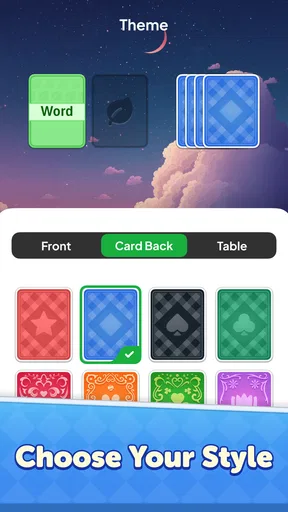
The app features an intuitive interface, hundreds of levels, and daily challenges to keep players engaged. It also includes a hint system to assist with difficult levels, and a variety of themes to customize the appearance of your game. Additionally, it supports offline play, allowing you to enjoy the game anywhere.
Can I play Word Solitaire Now! offline?
Yes, Word Solitaire Now! supports offline play, making it a perfect companion for those times when you don't have internet access. You can enjoy the majority of the game features without needing a connection, although some updates or features may require online access.
Does Word Solitaire Now! include ads, and how can I remove them?
The game includes ads, which help keep it free for all users. If you prefer an ad-free experience, you can opt for an in-app purchase to remove ads. This option allows for uninterrupted gameplay and a more immersive experience.


